


Download TAS Fires – Bush Fire Alerts, Real-Time Map, Tasmania, Fire Service, Emergency Updates
Overview
TAS Fires is a dedicated Android application developed by the Tasmanian Fire Service to deliver timely and accurate information about active bush fires across Tasmania, Australia. The software is designed to help residents, emergency personnel, and outdoor enthusiasts stay informed during fire seasons by providing real-time updates on fire locations, sizes, and developments. By integrating data from official sources—including the Tasmanian Fire Service’s RSS feeds and wind data from the Bureau of Meteorology—the app offers a comprehensive view of current fire activity.
Users benefit from a dual-view interface: a searchable and sortable list of fires, prioritized by proximity to the user’s current location, and an interactive map that visualizes fire spread and risk zones. This functionality supports situational awareness, particularly for those in high-risk areas or planning travel through fire-affected regions. The app enables users to share critical alerts via email, text, or social media, promoting community-wide preparedness.
While the app does not cache data and requires a continuous internet connection, it emphasizes the importance of relying on official sources for life-critical decisions. The developer did not provide additional details on user demographics or usage statistics. However, the application’s design suggests it targets individuals seeking localized, up-to-date emergency information during bush fire events.
Key Features & Capabilities
- Real-Time Fire Data Integration – The app pulls live updates from the Tasmanian Fire Service’s RSS feeds, ensuring users receive the most current information on active fires, including location, size, and status.
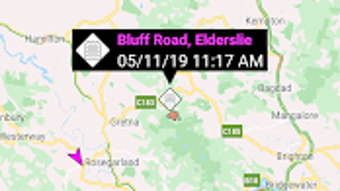
- Interactive Map View – A dynamic map displays fire locations, with visual indicators for proximity and intensity. Users can zoom, pan, and explore regional fire activity.
- Proximity-Based Fire List – Fires are displayed in a list sorted by distance from the user’s GPS location, helping prioritize immediate threats.
- Weather and Wind Integration – Wind data from the Bureau of Meteorology is incorporated to provide context on fire behavior, such as potential spread direction.
- Shareable Alerts – Users can easily forward fire alerts via email, text message, or social media platforms, supporting rapid dissemination of emergency information.
- Location-Aware Display – The app uses the device’s GPS to determine the user’s position and tailor fire data accordingly, enhancing relevance and response speed.
These features support practical use cases such as monitoring fire threats while commuting, preparing evacuation plans, or coordinating with emergency services. The integration of multiple data sources allows for a more informed assessment of local risk, though users are reminded that the app is not a substitute for official guidance.
User Interface, Workflow & Performance
The user interface of TAS Fires is designed with clarity and functionality in mind, prioritizing fast access to critical information. Navigation is straightforward, with a primary screen displaying either the map or the list view, switchable via a simple tab system. The layout is minimal, reducing cognitive load during high-stress situations.
Workflow efficiency is optimized for emergency use: users can quickly locate nearby fires, assess their status, and share updates without navigating through multiple menus. The app’s responsiveness is consistent with standard Android applications, though exact performance metrics were not specified. The developer did not provide information on CPU or RAM usage, so resource impact remains unknown.
Stability appears to be maintained through reliance on official data feeds and lightweight design. However, since the app does not cache any data, it depends entirely on real-time connectivity. This means performance is directly tied to internet speed and signal strength. Users in remote or low-connectivity areas may experience delays or incomplete data loading. The developer did not specify any known bugs or crashes.
Compatibility & System Requirements
TAS Fires is available exclusively for Android devices. The current version is 1.2.2, with an installation size of 12.4 MB, indicating a lightweight footprint. The app is compatible with Android operating systems, though specific version requirements were not listed by the developer.
Exact system requirements were not provided. However, given the app’s reliance on GPS, internet connectivity, and real-time data processing, it likely requires a device with a functional GPS receiver, stable internet access, and a modern Android OS. The developer did not specify minimum screen size, processor speed, or memory requirements.
Users should ensure their device supports background data and location services to maintain continuous updates. For optimal performance, devices with active internet connections and up-to-date operating systems are recommended.
Pros and Cons
Pros
- Real-time updates from official Tasmanian Fire Service data sources
- Interactive map with proximity-based fire visualization
- Proximity sorting helps users identify immediate threats
- Integration with Bureau of Meteorology wind data enhances situational awareness
- Simple, intuitive interface optimized for emergency use
- Free to download and use with no in-app purchases
- Easy sharing of alerts via multiple channels
Cons
- No offline mode or data caching; requires constant internet access
- Dependent on GPS accuracy and signal strength for location-based features
- Exact system requirements not disclosed by the developer
- Performance may vary in low-connectivity or remote areas
- Not intended as a replacement for official emergency alerts or safety protocols
FAQ Section
Is TAS Fires available for iOS devices?
TAS Fires is currently only available for Android. There is no official iOS version listed by the developer.
Can I use TAS Fires without an internet connection?
No. The app does not cache any data and requires a continuous internet connection to retrieve real-time fire and weather information.
How accurate is the fire data in the app?
The accuracy of the data depends on the reliability of the Tasmanian Fire Service’s RSS feeds and the device’s GPS signal. The app is designed to reflect official updates as closely as possible.
Does the app use my location data?
Yes. The app uses your device’s GPS to determine your current location and display nearby fires. Location access can be disabled in device settings.
Is TAS Fires safe to use during emergencies?
Yes, the app is developed by the Tasmanian Fire Service and provides verified information. However, it should be used alongside official emergency alerts and not as a sole source of safety guidance.
Final Thoughts + CTA
TAS Fires stands out as a reliable, no-cost tool for staying informed about bush fire activity in Tasmania. Its real-time integration of official data, combined with an intuitive interface and location-aware features, makes it a valuable resource for residents, travelers, and emergency responders. While the lack of offline functionality and unspecified system requirements are notable limitations, the app’s core purpose—providing timely, accurate fire alerts—is fulfilled effectively.
For individuals living in or visiting fire-prone areas of Tasmania, this app offers a critical layer of preparedness. It is especially useful during peak fire seasons when conditions can change rapidly. The developer’s commitment to using verified sources enhances trust in the information provided.
Download TAS Fires now to stay updated on the latest bush fire alerts and protect yourself and your community.







